
Spot UV folders
Clear, high-gloss varnish applied to selected areas of your folder.
Draw attention to logos, typography or pattern detail with a tactile gloss layer over the printed cover. Available in gloss and matte finishes, on single or double-sided runs.
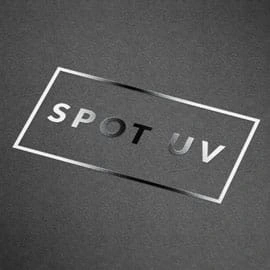
What is spot UV?
Spot UV is a clear, UV-cured varnish applied to selected areas of a printed folder rather than the whole surface. The varnished areas appear glossy and slightly raised; the surrounding stock stays matte. That contrast is what gives spot UV its visual impact.
For the strongest effect, spot UV is applied over matte lamination — the matte base maximises the gloss contrast and protects the stock from marking. Spot UV can also be applied directly to uncoated or silk stocks, though the contrast is less pronounced.
When to use it
Spot UV is chosen for impact, not legibility. Text spot-varnished over print reads as a tactile, reflective effect — not as a colour change.
Logo highlight
Draw the eye to a logo or brand mark on a matte-laminated cover. The most common use of spot UV.
Hero typography
Emphasise a tagline or large display headline as a tactile, reflective layer over the printed text.
Decorative pattern
Watermark patterns, textures or repeated motifs across the cover that catch the light at angle.
Imagery & icons
Spot-varnish over product imagery or feature icons to add tactile depth without changing colour.
Gloss vs matte spot UV
We offer both. Pick one for the look you want — or combine both on the same folder for layered finish effects.
Gloss spot UV
The standard choice. Maximum gloss contrast against a matte-laminated background — catches the light, works well for logos, and gives a foil-style highlight without the cost of foil.
Matte spot UV
A tactile sheen difference rather than a strong gloss. Suited to understated branding or pattern effects on gloss-laminated stocks. The two finishes can be combined on the same folder for layered effects.
Artwork requirements
A dedicated spot UV layer on a print-ready PDF is all we need. We'll proof every job before the varnish goes on.
Place the spot UV area on a separate layer named Spot UV, set to overprint. Vector elements only, filled with 100% black (K). Match bleed and trim to your main print artwork.
Print-ready PDF, layers preserved.
Finer risks losing definition under varnish.
Allow this clearance against print edges.
Vector elements only, set to overprint.
Not sure how to set up a spot UV layer? Send us your design and we'll prepare it for you, or check our full artwork-supply guide for the pre-submit checklist.
Read the artwork guideSpecifications at a glance
Practical details for planning your run.
- Minimum order quantity
- No MOQ — bespoke runs of any size.
- Standard lead time
- Standard production + 2–3 working days for the spot UV pass.
- Sides available
- Single or double-sided (supply two layers in artwork for double).
- Compatible stocks
- Best on matte-laminated stocks. Works on silk and smooth uncoated. Not recommended on textured (recycled, kraft) — the varnish absorbs and loses gloss.
- Tooling / setup
- Quoted per design — typically lower than die-cutting or foil tooling.
- Combined finishes
- Compatible with foiling, embossing and die-cutting in the same job.
Frequently asked questions
Send us your
artwork
Send us your artwork — or just describe what you have in mind — and we'll come back with a price, lead time and proof within one working day.
Or speak to our team on 023 8087 8030 or email Sales@PrintedFolders.co.uk — happy to talk through technique, stock and combined finishes.